Most of you probably remember, and have watched, a movie called ‘The Terminator‘. It starred Arnold “Arnie” Schwarzenegger as a robot from the future, clothed in a real flesh and blood body. In case you never saw it, I won’t ruin it for you; however, there was a scene in the middle or so of the movie where the terminator is outside a police station. The officer in the station won’t answer his questions nor let him in, so “Arnie” steps up close to the window, and utters his famous line – in his very “Arnie” accent – “I’ll be back!“
Well, back in November of last year, I was not planning on uttering that phrase; rather, I was prepared to utter, “That’s all, folks“, in regard to my web/blog site Deep Brain Thoughts (DBT). I’m not going to answer the question of why I was planning on hanging up my writer’s hat (I’m postponing that for my next blog post, “The Strange Case of Dr. Parkie and Mr. Hyde!”, hopefully out in the next few weeks!). But to give the short answer… as I was backing up my old website before I deleted it for good, I realized how many posts I had written, and if I say so myself, they were pretty darn good! I then heard from some of you, and realized that my words from my blog may just have helped a number of folks out there – and that is the reason why I started DBT in the first place. So I did an about-face and decided to keep going with the blog after all! However, the site that my blog was on, Wix, just wasn’t cutting it – plus it was getting more and more expensive each year… I realized then that I needed to move off the Wix host platform and onto something a little less expensive, more ‘open‘, and with more features.
So I am happy to say, at this time….
“I’m BAAAACK!”
Yes DBT is now back up in operation, on a shiny new web hosting platform! I switched from Wix to DreamHost… Now the DreamHost provider is much more standard and open than Wix was – plus more powerful. However, with more power comes more complication – and that is why it’s taken me almost two full months to bring DBT up on the new host platform. I basically had to start from scratch, and import (or retype!) almost all of my old media, including old blog posts! And I am still not completely done – you may notice that all my old blog posts are not yet on the new site – I’ll be importing most of them in the coming weeks.
However, I felt it was functional enough to go live – even though I am sure a few issues will crop up here and there.
So, ready or not,

here it is!
What I am going to do in this post is describe some of the new features of DBT, along with some differences. And I’ll throw in a couple ‘tidbits‘ of advice to help you navigate the website.
Before we get started, let me give you one of those ‘tidbits’ of advice regarding the DBT email messages. It is possible that your email provider – Gmail, Outlook, Yahoo, etc. could consider my DBT email messages ‘junk‘ and place them in your junk or spam folder rather than your inbox. If that happens you may never get any messages from me on new blog posts and such. I will soon try to put out a new FAQ giving you ways to fix this for those common email providers; however, the easiest way to do this now is to simply add the DBT email address(s) to your Contacts list. That way your provider will consider DBT ‘valid‘. Just add a new contact with the company name ‘Deep Brain Thoughts‘ and the email addresses info@deepbrainthoughts.com, along with tom@deepbrainthoughts.com; then save the contact. After this you –should– get my emails with no problems.
Basics: The first thing you may notice is that the site looks very similar to the old DBT. At the top is the menu; followed by my header and logo, along with my starry dark sky top border. Following this are my blog posts listings on the left; a right ‘sidebar‘, and a footer. So let’s dive into those items…

Menu: The menu has been moved to the top of the screen. Not only that, the menu ‘disappears‘ when you scroll down the page, to give you more reading space. However, once you begin scrolling back up the page, the menu reappears at the top again. Pretty slick, huh? Also, the same menu is at the bottom of the page (called the ‘footer’ in web-design talk) in case you’ve scrolled to the bottom and want to go elsewhere in the blog without having to scroll back up.
There are a number of new or different options in the menu. There’s the old ‘About Tom‘ and the Gallery, but the other options are either different or new. Parkinson’s News contains all the news articles displayed in the news widget below (more later); Reviews will be similar to the old option where I post reviews on PD and other items I try and/or use – however, it is still ‘Under Construction‘. Tools and Resources is a new heading for the old “Tom’s Favorite” and “PD Resources” links (now a submenu in Tools and Resources). Gallery is still the same gallery of photos and videos (although different in design); FAQ (Frequently Asked Questions) is still the same – although rendered differently; but in the future will be expanded to include more general PD questions. Finally, Contact will pop-up a contact form so anyone can ask yours truly any question you might want to ask – whether it be PD related, questions about the website, or whatever. Finally, to the far right, is the Search icon  – click it to search the entire site.
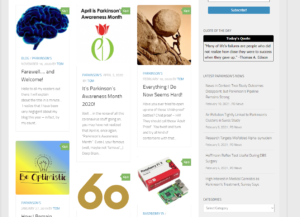
Main Page: The left-column of the the Main page still shows my blog postings. At the top is a ‘slideshow’ of up to 5 of my most popular posts. I’m not sure I will keep this in the future (big pics!) but for now it is there. Following this are my recent blog posts in a shortened form; but now using a 3-column masonry pattern. You’ll be able to scroll (paginate) throughout all my blog posts from right here; hence no need for a separate Blog Pages menu option.
As I mentioned before, not all of my old posts have been moved over yet, so if you remember a post that is not there, just keep checking and it should appear in the near future. If you really need a certain post like now, just let me know and I’ll move it up to the top of the list for conversion.
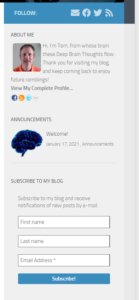
Sidebar: The right sidebar is considerably different and more functional than the previous version.
First at the top is a blue bar with my social icons – Facebook, Twitter, and the like. Next there’s the old About Me that used to be in the footer – now at the top of the sidebar. The Announcements widget replaces “Tom’s Updates” (it does the same thing) – this is where you’ll find any announcements from me.
Next is the ‘Subscribe‘ widget where you can subscribe (or sign up) for my email notifications.
After that is my new “Quote of the Day” widget – hopefully you’ll find them inspiring and funny! Then next is the familiar “Parkinson’s News” in a different but just as easy-to-read (hopefully) format. As I find interesting articles on Parkinson’s I’ll post them here as I used to do on the old web site.
Next are two new items: A ‘Categories‘ and ‘Archives‘ dropdown. This lets you ‘filter‘ the listing of blog pages at the left. The Categories dropdown let’s you, for instance, to see just Parkinson’s posts, or only those about technology. The Archives lets you filter the posts by month. This will give you easier access to blog posts without having to scroll through the entire list!
Last but not least there’s my familiar Facebook feed at the end of the sidebar.
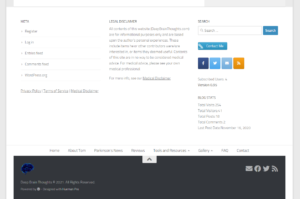
Footer: The footer section(s) are different, in that they are bigger and have more information. There are now a number of different footers, each one displaying different content – ‘meta‘ information about the blog; my new Legal Disclaimer; a search bar, Contact Me button, and blog stats. In addition, on the left are the new Privacy, Terms of Service, and Medical Disclaimer Policy Statements (which I would encourage you to review). The bottom bar has the usual copyright notice; my logo; social bar; and finally a ‘Return to top‘ arrow icon that – you guessed it, takes you back to the top of the blog!
New Viewers (Users)

If you are a new user who just subscribed to my site (whether automatically by me or done yourself via ‘Subscribe’), the previous section may not mean much or be that interesting to you, since you never saw the original old site. If that’s the case, what I would recommend is that you simply get on the new site and explore!
If you would like to get some idea as to my style of writing and the variety of topics I write about, I would suggest you start with these top 5 ‘Favorite‘ posts:
- Top 10 Challenges of Living with a ‘Parkie’
- The Bygone Days of Exciting Tech
- Deep Brain Stimulation (DBS) Part 1: My Journey to an Electric Brain
- Start here, then review Parts 2-4
- Retired… So NOW what do I do??
- Tom’s Common Sense 101

Future Items
I’m planning on a number of new things to add to the blog in the future. Here is just a ‘short‘ list:
- Correcting any issues and bugs that crop up (of which I am sure there will be!)
- Adding most, if not all, past posts;
- Adding back in the ‘Review‘ section;
- Adding in a more general PD FAQ section;
- Sprucing up the Resources and Favorites Link section;
- Add in a new Events page, for walks, seminars and other events;
- Add Breadcrumbs to each page;
- “Breadcrumbs are hyperlinks on a webpage and refer to a specific website navigation technique. Breadcrumbs typically appear horizontally near the top of a Web page, providing links back to each previous page that the user navigates through in order to get to the current page.“
- Optimize the site to ‘speed it up‘;
- And maybe, in the future, a new DBT Products page that could list free and purchasable products (I’m seriously thinking of making a DBT T-Shirt!!)
- And any thing else that might come out of my Deep Brain Thoughts!
I’d also like to let y’all know I am planning on doing a some type of ‘VIDEO‘ post (a vlog?) in the near future. This would most likely be a Q&A session with yours truly where folks could connect and ask me any questions they wish – for example, about my DBS, Parkinson’s info, things that I’ve tried, best places to eat (nah just joking… although…), etc. How it might work is that folks would submit questions; myself or my editor-in-chief (my lovely wife) would filter the questions; and then I would answer – or attempt to answer – those questions. I’m still thinking about this and trying to figure out how it would work; but stay tuned – I’ll announce it once I’m ready!
So there you have it, the NEW DEEP BRAIN THOUGHTS Blog!! I’m excited – and a little frightened – to be back… I hope I can earn your trust and not even think about quitting the blog again. However, I will most likely not be able to maintain a short 2-3 week schedule of new posts like I did previously – more likely it will be me publishing new posts on a monthly basis. And I promise to do my best to maintain my optimism and hope – it has been tried quite harshly in the last year. Unfortunately Parkinson’s doesn’t stand still – we Parkies know that it is only going to advance and get worse as time goes on. All I can promise is to do the best I can do while I can do it!
Use the comments section(s) to comment on any of the blog postings, and feel free to contact me via the Contact form with any questions, problems with the blog, new ideas on or for the blog, and any nice words regarding what I’ve posted – I can always use the encouragement!

It’s been a long couple of months pulling this all together, so I think I’m going to take a week off here and catch up on some other items. But I’ll be back at it after that with a new blog post!
So for now, enjoy the new site, and keep those comments and notes coming in!